
1. How to use Risiko
1.1. Introduction
Risiko is based on geonode (http://geonode.org/).
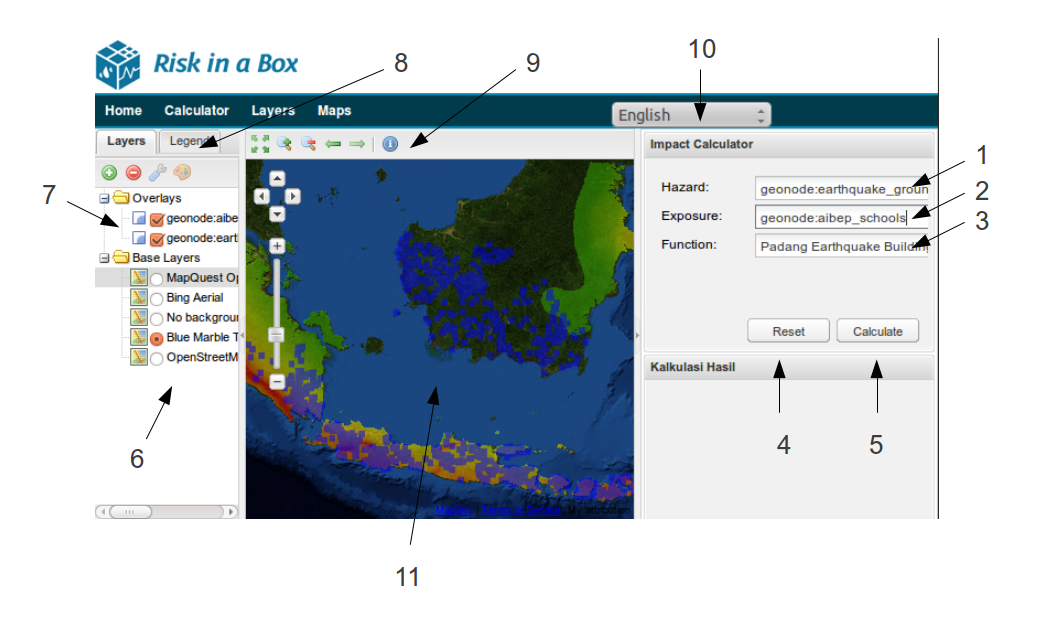
Risiko screenshot of main calculation area
- The selected Hazard layer
- The selected Exposure layer
- The function to use to determine the Impact from the Hazard and Exposure
- Button to reset the layers and any calculation
- Button to start the calculation
- The list of the base map layers
- The list of the Hazard and Impact layers
- The Legend for the map
- The info button - allows the selection of point of calculation impact points (e.g. houses) and shows details for that point.
- Language Selection
- The main calculation map
Note
This page is a placeholder for a more complete user guide.